A business coach, organizational consultant, or lecturer running a practice in Israel faces a unique challenge: they are the product, the marketing department, the front office, and the service provider all at once. An incoming WhatsApp message between two client sessions doesn't always get a quick response; a discovery call scheduled without prior screening questions can end up being an hour wasted on an unqualified lead; preparation materials are sent manually, over and over, to every new client. Automation and AI bots solve this: they manage the lead lifecycle from the initial inquiry to the meeting, and the program workflow from start to finish — without adding more hours to your day.
How Automation Helps a Coach or Consultant
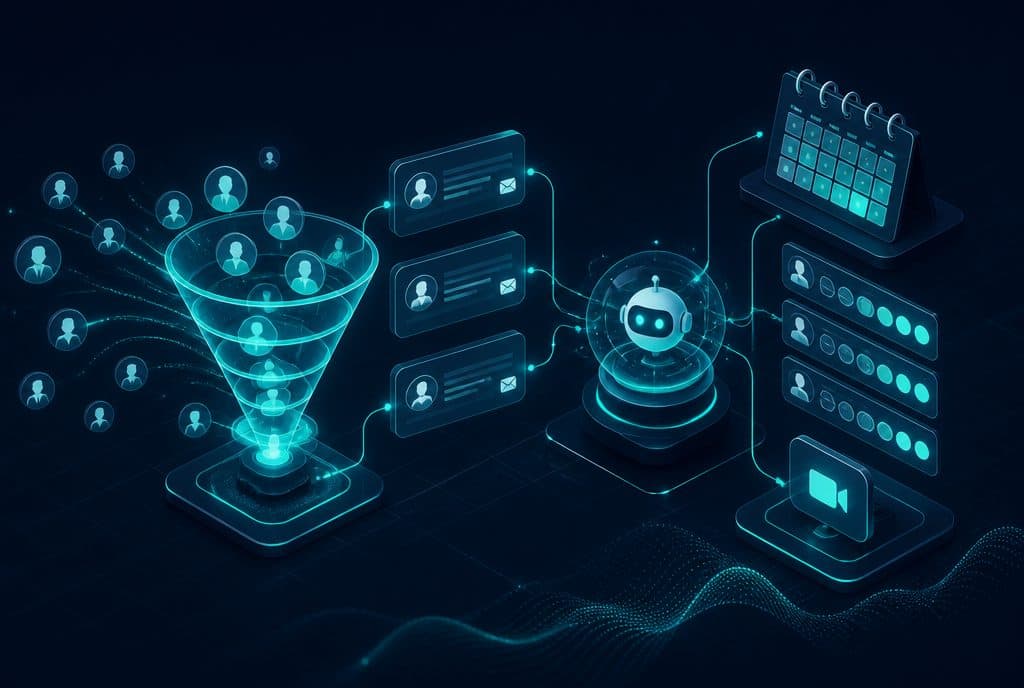
Automation and AI bots manage the entire lead lifecycle for a coach or consultant: they reply to WhatsApp inquiries within seconds, ask screening questions based on your criteria, schedule discovery calls in your calendar, send preparation materials, and remind the client before the meeting. After the meeting — they send a summary, a price quote, and smart follow-ups. During an active program: they deliver content according to the roadmap, track progress, and remind students about tasks and upcoming sessions. Everything runs quietly in the background while you focus on your clients.
What Coaches and Consultants Manage Manually — and What It Costs Them
Most people building a consulting or training practice in Israel do the following tasks manually:
- Responding to inquiries: WhatsApp messages, contact forms, LinkedIn — each requires a personal response and preliminary questions.
- Scheduling meetings: The back-and-forth of "when are you free?" until finding an open slot.
- Sending materials: Links, preparation guides, intake questionnaires — resent to every single client.
- Reminders: Manual SMS or messages before every call, because no-shows cost money.
- Follow-up: After a discovery call — sending the proposal, follow-up email, or a reminder if they haven't replied.
- Program management: Sending weekly modules, tracking task completion, and scheduling 1-on-1 sessions.
Each action alone takes a few minutes. Together, they turn into hours per week that are not being billed to clients.
The Actions Automation Does for You
| Stage | Automated Action | How It Works |
|---|---|---|
| Incoming Inquiry | Immediate WhatsApp response | The bot replies within seconds, presenting what you offer |
| Lead Screening | Preliminary questions based on your criteria | Industry, goal, budget, experience — according to your definitions |
| Scheduling Discovery Call | Automatic calendar booking | The client chooses an open slot; an event is created in both calendars |
| Meeting Preparation | Sending materials + reminder | Intake questionnaire, preparation guide — sent automatically; reminder sent two hours before |
| Post-Discovery Call | Summary + Follow-up | Agreement, proposal, or registration link — sent immediately after the meeting |
| Active Program | Weekly modules | Content, tasks, and reminders are sent according to a schedule you define |
| Forgotten Manual Follow-up | Reminder to inactive client | If the client hasn't completed a task — they receive a message at a predetermined time |
Practical Scenarios: How It Looks in Action
Business Coach for Small Business Owners
Liat reaches out via Instagram — "I'd love to hear about business coaching." The bot replies within a few seconds, asking three short questions: what is the business industry, how long has it been active, and what is the main goal she wants to achieve. Screening happens automatically; if Liat fits the profile, she receives a link to schedule a discovery call. A short intake questionnaire is sent before the meeting and reaches you before you hop on the call.
Organizational Consultant for Companies
An inquiry comes in from an HR Manager searching for "management training Israel." The bot allows her to leave details, sends an initial intake questionnaire (team size, topic, estimated budget), and displays available meeting slots for a discovery call. All details enter the CRM before a single conversation takes place. When the consultant joins the call — she has full context.
Lecturer Selling a Digital Program
After purchase, every student receives an onboarding protocol: a welcome email with access links, a WhatsApp message requesting to save the contact, and automatic delivery of the first module. The following week — the second module is sent with a reminder. A feedback survey is sent at the end of the module. Everything is managed through n8n with zero manual touch.
Tools of the Trade
An automation system for a consulting practice is typically built from several layers:
- AI Agent for WhatsApp — Manages the conversation with the lead, asks questions, and schedules meetings. See AI Agent for WhatsApp
- Automated Lead Management — Every lead enters the CRM, receives a status, and is linked to their entire history.
- Automated Scheduling — The client chooses a slot without the back-and-forth.
- n8n — Connects all systems: WhatsApp, calendar, CRM, email, and SMS.
- CRM — Stores the entire history of the lead and the active client.
For further reading on automated lead management, see our Lead Management Guide.
How to Get Started?
The right approach is modular — don't try to overhaul everything in one day:
Step 1 — Mapping: Map out the types of incoming inquiries, how many stages exist until a program is signed, and which actions are repeated the most. Usually, you will find 3-5 actions that take up the most time and can be streamlined immediately.
Step 2 — Screening & Scheduling Bot: Start with the point that saves the most time — responding to inquiries + screening questions + scheduling meetings. This alone changes the quality of your discovery calls and reduces no-shows.
Step 3 — CRM Integration: All data enters one place automatically. No more "where did I save their contact details?"
Step 4 — Active Program Protocols: Sending modules, reminders, and follow-ups to students — so that a client who signed up doesn't get "forgotten" along the way.
Questions to Ask Before You Start
Before building an automation system, it's worth answering a few questions:
- What is the most common inquiry you receive — and through which channel?
- What screening questions do you usually ask during a first call?
- How much time on average passes between an inquiry and a discovery call — and where do leads "drop off"?
- What happens after a client signs — is there a clear protocol that can be replicated?
These answers are the foundation of a good system design. Without mapping, automation might solve the wrong problem.
How much does it cost?
| Component | Price (one-time setup, ex-VAT) |
|---|---|
| AI booking agent — simple | ILS 8,000 |
| Calendar link and meeting booking | ILS 2,000 |
| Appointment reminders and confirmations | ILS 1,750 |
| Automatic follow-up sequence | ILS 2,500 |
| WhatsApp Business API setup | ILS 700 |
A complete starting point — a WhatsApp AI agent including the business number, server and agent control room — is from ILS 10,200; an agent with a management system (CRM) from ILS 18,200, a multi-agent system from ILS 25,350. There is no monthly fee; third-party costs (server, messages, AI) of about ILS 100–500 a month are paid directly to the providers. The full component price list: pricing page.
Summary
A coach, consultant, or lecturer running an active practice shouldn't have to act as an administrator. Automation and AI bots manage all stages of the lead lifecycle — from the first inquiry, through screening, scheduling the discovery call, sending materials, and post-meeting follow-ups. Once signed, they also manage the program stages: sending content, tracking progress, and sending reminders — without you having to remember to do it yourself.
The practical result: more leads making it to meetings, less administrative time, and the ability to focus on what you are truly good at — leading people to results.